IT Infrastructure Basics for Beginners
Every modern business depends on technology to complete its daily work. Computers, servers, networks, storage systems, cloud platforms, and security tools all work together to keep…

Every modern business depends on technology to complete its daily work. Computers, servers, networks, storage systems, cloud platforms, and security tools all work together to keep business operations running smoothly. Understanding IT Infrastructure gives beginners a clear idea of how these technologies connect and support an organization. For students and people starting an IT career, learning these basics can provide a strong foundation for more advanced technologies.
What Is IT Infrastructure?
IT infrastructure refers to the collection of hardware, software, networks, services, and other technology resources used by an organization. It provides the technical foundation that allows employees to communicate, access applications, store information, and complete their work.
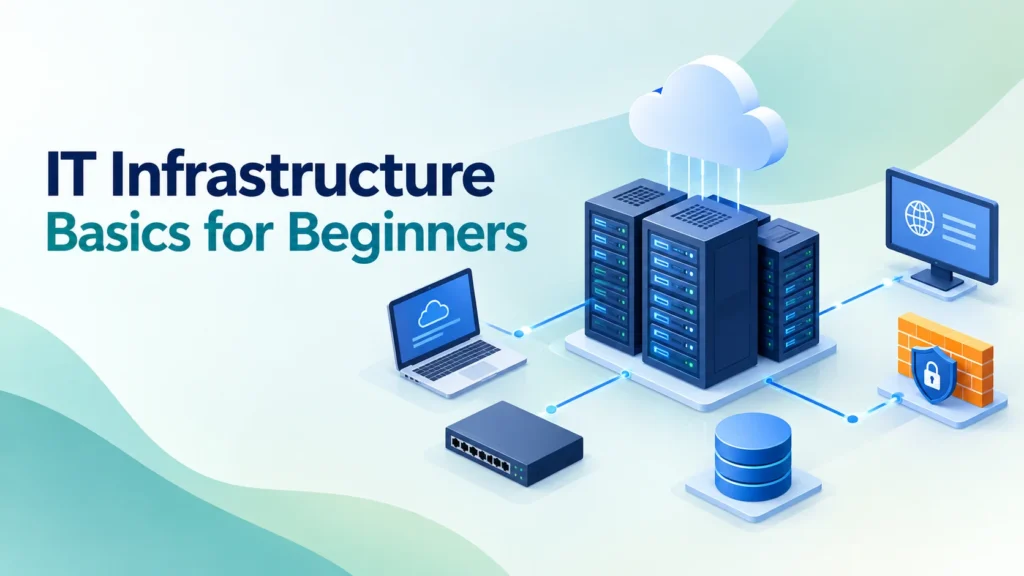
For example, imagine an office where employees use computers to access files stored on a server. The network connects those computers to the server, while security systems control access to company resources. Cloud services may provide additional applications and storage. All these components work together as part of the organization’s technology environment.
For beginners, it is important to understand that infrastructure is not limited to physical computers. It includes many different technologies that work together to provide reliable IT services.
Main Components of IT Infrastructure
A typical technology environment includes several important components. Understanding each one helps beginners see how an organization’s IT environment works.
Hardware
Hardware includes the physical devices used to provide and access IT services. These can include desktop computers, laptops, servers, switches, routers, storage devices, and data center equipment.
Servers have an important role because they can host applications, store files, manage users, and provide different services. Networking devices connect computers and allow them to communicate with each other.
Software
Software provides the instructions that allow hardware to perform specific tasks. Operating systems, server applications, databases, monitoring tools, and security applications are common examples.
Windows Server and Linux are widely used in server environments. Administrators choose software based on business needs, security requirements, performance, and compatibility.
Networking
Networking allows computers, servers, applications, and other devices to communicate. Routers, switches, firewalls, IP addresses, DNS, and DHCP are some of the important networking concepts beginners should learn.
A basic understanding of networking makes server administration and cloud technologies easier to understand. Beginners can start with concepts such as IP addresses, ports, protocols, subnetting, and network devices.
Storage
Organizations create and use large amounts of data every day. Storage systems help businesses save documents, application data, databases, backups, and other important information.
Storage can exist on local servers, dedicated storage systems, or cloud platforms. Administrators need to understand storage capacity, performance, availability, and data protection.
Understanding Servers
Servers are one of the most important parts of an IT environment. A server provides resources or services to other computers and users.
Depending on its purpose, a server can manage users, host applications, store files, run websites, provide databases, or support network services.
For example, a file server stores documents that employees can access through the company network. A web server hosts websites or web applications. A database server manages structured business information.
Beginners should learn how servers work, how they communicate with other devices, and how administrators monitor and maintain them.
The Role of Virtualization
Virtualization allows organizations to run multiple virtual machines on a physical server. Each virtual machine can have its own operating system and applications.
This approach helps organizations use physical hardware more efficiently. It also makes testing, development, backup, and server management more flexible.
VMware and Hyper-V are common examples of virtualization technologies. Once beginners understand basic virtualization concepts, they can move toward more advanced areas such as private cloud, hybrid cloud, and data center technologies.
Importance of Cloud Computing
Cloud computing has changed the way organizations build and manage technology environments. Instead of maintaining every resource inside a physical data center, businesses can use services provided by cloud platforms.
Cloud services can provide computing power, storage, databases, networking, security, and applications. Organizations can choose public, private, or hybrid cloud environments based on their requirements.
Beginners do not need to learn every cloud service at once. It is better to start with basic concepts such as virtual machines, cloud storage, networking, identity management, and resource management.
Network Security Basics
Security is an important part of every technology environment. Organizations need to protect systems and data from unauthorized access, malware, data loss, and other threats.
Beginners should understand basic security concepts such as:
- User authentication and access control
- Firewalls and network security
- Antivirus and endpoint protection
- Data backup and recovery
- Security updates and patch management
- Monitoring and system logs
Security should not be treated as a separate activity. It needs to be considered when systems are designed, configured, and maintained.
Monitoring and Troubleshooting
IT environments can experience different problems. Servers may become slow, networks may stop working, storage may become full, or applications may produce errors.
Monitoring helps administrators understand system performance and identify problems early.
Some important areas to monitor include:
- CPU and memory usage
- Disk space and storage performance
- Network traffic
- Server availability
- Application and system logs
- Service status
Troubleshooting is another important skill. Administrators need to identify symptoms, check logs, test possible causes, and apply suitable solutions.
Good troubleshooting requires logical thinking and patience. Instead of trying random solutions, administrators should understand the problem first and then take appropriate action.
How IT Infrastructure Online Training Can Help Beginners
Learning infrastructure concepts independently can sometimes feel confusing because many technologies are connected. IT Infrastructure Online Training can provide a structured learning path for beginners who want to learn these technologies step by step.
Online training can also provide flexibility. Students can study according to their schedules and revisit difficult topics when needed.
When choosing IT Infrastructure Online Training, beginners should look at more than the course name. The course should include practical learning, lab exercises, troubleshooting, and commonly used technologies.
What Beginners Should Look For
A good learning program should cover areas such as:
- Server administration
- Networking fundamentals
- Windows Server and Linux
- Virtualization
- Cloud computing
- Storage and backup
- Security and monitoring
- Practical lab exercises
Hands-on practice makes technical concepts easier to understand because students can see how different technologies work together.
What Is IT Infrastructure Certification?
An IT Infrastructure Certification can show that a learner has studied specific infrastructure concepts and developed knowledge in a particular technical area.
Certification can be useful for beginners who want to organize their learning and demonstrate their technical knowledge. It can also encourage learners to follow a structured study plan.
However, certification alone does not replace practical experience. Employers often look for people who can understand problems, work with systems, troubleshoot issues, and communicate clearly.
Before pursuing an IT Infrastructure Certification, learners should understand what topics the certification covers. They should also spend time practicing those technologies.
Benefits of Learning IT Infrastructure
Learning infrastructure basics can provide several benefits for students and entry-level IT professionals.
Strong Technical Foundation
Beginners learn how servers, networks, storage, applications, and security systems work together.
Better Troubleshooting Skills
Understanding infrastructure makes it easier to identify the possible causes of technical problems.
More Career Options
Infrastructure knowledge can support different IT career paths, including server administration, networking, cloud computing, and technical support.
Preparation for Advanced Technologies
Basic knowledge makes it easier to move into areas such as virtualization, cloud computing, cybersecurity, automation, and DevOps.
More Practical Confidence
Working with labs and real-world scenarios helps beginners become more comfortable with technical environments.
Career Opportunities in IT Infrastructure
Infrastructure knowledge can support several IT career paths. Beginners can start with entry-level support or administration roles and develop specialized skills over time.
Some possible roles include:
- System Administrator
- Network Administrator
- Server Administrator
- Infrastructure Administrator
- Technical Support Engineer
- Cloud Support Professional
- Data Center Administrator
The right career path depends on a person’s interests and technical skills. Someone who enjoys working with servers may focus on Windows Server or Linux. Another person may prefer networking, virtualization, cloud computing, or security.
How Beginners Can Build Practical Skills
Reading about technology is useful, but practical experience plays an important role in developing infrastructure skills.
Beginners can create a small virtual lab and practice common administrative tasks. For example, they can create virtual machines, configure basic networking, install a server operating system, create users, manage permissions, and monitor system resources.
A lab provides a safe environment where learners can make mistakes and understand how to fix them.
Keeping notes during practice can also help. Beginners can record commands, configurations, errors, and solutions. Over time, these notes can become a useful troubleshooting guide.
Conclusion
IT Infrastructure forms the foundation of modern business technology. Servers, networks, storage, virtualization, cloud services, security, and monitoring all work together to keep IT operations running.
Beginners should focus on understanding how these components work together instead of trying to memorize every technical term. A structured learning path, regular practice, and troubleshooting exercises can make the learning process easier.
For learners who want a flexible approach, IT Infrastructure Online Training can provide guided learning and practical exposure. Those who want to validate their knowledge can also consider an IT Infrastructure Certification after developing a strong technical foundation.
With consistent practice and curiosity, beginners can gradually build the skills needed to work with modern IT environments and move toward a successful IT career.
Discover more from RealTech IT Academy
Subscribe to get the latest posts sent to your email.